Note: My international school is just starting virtual school for the current school year, so we are now just experiencing what many schools have been doing for most of the year. I posted the following to our Wellness blog.
I hung up my instructional technology hat a ways back, so I can’t offer the latest tools, tips, or techniques that many of our staff use in their virtual learning delivery. I can offer pedagogical strategies that have worked in the past and can definitely be supported through technology to enhance learning in virtual schools.
Concept/Mind Maps
 Concept/Mind maps help students make their thinking visible, primarily when representing connections between ideas, events, topics, etc. Concept maps also can be used as collaboration tools.
An excellent way to use concept maps for virtual learning is to use an online provider like Mindmeister. Students can share their Mindmeister concept maps with you to access their thinking, especially for formative assessment of their understanding as the unit of study progresses. Virtual collaboration is supported if you partner with students or place them in groups to work together to use mind maps for multiple purposes. Here is a mind map template for essential questions one teacher provided his students. Look at a blog post describing how students used concept maps to answer the essential questions for their units of study at a couple schools.
Learning Activity Types via TPACK
 Several American professors came together in 2010-11 to organize learning activity types (LAT) into nine subject areas supported by technology. They published articles about their efforts. Here is one. They provide research-supported pedagogies in their Learning Activity Types website hosted at the College of William & Mary School of Education. They apply the TPACK construct for planning purposes. Look to their website by going to the left side menu to select from the nine learning activity-type disciplines. The supporting technologies are from 2011, so adapt ones that still exist today and/or find the latest iteration or replacement tool that best supports each pedagogy. Image Source
Multimedia Essays (Media Mashups)
 Writing essays is one of the most precious skills that we teach our students. But sometimes, our students can benefit from an alternative learning experience and assessment that engages the full range of their ICL skills. We can differentiate and add complexity to the standard writing process by having students create multimedia essays where they “mash up” various sources of media to communicate their thinking. At the time, a William and Mary doctoral student describes her work with multimedia essays in this podcast. Image Source
Personalized Learning System (PLS)
 Students (and teachers) use technology to access information, to make meaning, to create and communicate their learning via a personalized set of resources for learning… a “go-to” 24/7 technology and information access toolkit – a Personal Learning System (PLS).
We guide our students to work as architects designing and maximizing their “learning flow” (think of the term workflow) while also engaging in time management techniques to increase efficiency and purposeful productivity. Self-directed and growth-minded students use devices, apps, Web tools, and information sources, putting themselves in charge of their learning. Here is a web resource describing what a Personal Learning System can look like and a planning document for students to work with. Image Source
Sketchnoting (Visual Note-Taking)
 Our students live in a media-rich world. They think in images, video, and sound while constantly making neural connections. The creation apps on phones, tablets, and computers offer students pathways to draw, audio record, insert images/video, and embed hyperlinks to information sources, all personalized. This is where visual note-taking comes in. We can expand note-taking choices beyond text recording into multiple modalities by guiding students to use mind maps, colors, shapes, images, and digital grouping by dragging and dropping objects and connecting lines to record their thinking. Image Source
The Six Thinking Hats
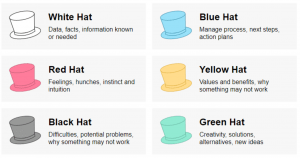
Edward de Bono created this approach to decision-making and problem-solving that guides users to think in terms of types of thinking and perspective. We can apply them for individuals and groups of students to use as they process information. Here is a helpful overview and a teacher’s application in her classroom. Image Source
Thinking Routines
 In the book Making Thinking Visible, Ron Ritchhart, Mark Church, and Karin Morisson help readers understand the power of thinking routines to help students process big ideas and make their thinking visible. Teachers routinely use the thinking routines in their regular face-to-face classes. One can also choose from a variety of technologies to also use in virtual school. Here is a dated web resource on the supportive tools one can use. However, the application of the routines is sound. If you are new to the routines, you can review an article by Ron Ritchhart and David Perkins entitled Making Thinking Visible. Also, look to go through the Harvard Project Zero Thinking Routine Toolbox. Image Source
WebQuests
 WebQuests are a natural pedagogy for virtual schools because they’re already web-based. They connect inquiry and research skills to students working in teams using their communication skills to present their findings. WebQuests are online research expeditions built by teachers that put the students into roles to find information from selected sites and other resources as they attempt to solve a real problem and/or answer a question. The students in teams analyze, curate, and then use the information to create a learning product to demonstrate their understanding. WebQuests are NOT internet scavenger hunts with students just going through a list of links. True WebQuests have the students performing in the authentic roles of historians, economists, mathematicians, etc. The culminating project is usually a performance task in which the students present their findings while playing their roles or applying the learning to produce a product. Image Source
___________________________________
A significant wellness connection for these pedagogies is that they engage students in PERMAH while exercising their Character Strengths. Collaboration amplifies Relationships with students using their strengths of kindness, leadership, and teamwork, to name just a few character strength applications. The process of creating definitely has students applying their strength of creativity within the pillars of Engagement and Accomplishment.
So how do we take these oldies but goody strategies and other current innovative and effective practices to spread them throughout our virtual school? One approach would be to form a virtual school design team in each division who become busy bees finding out what’s happening in virtual classrooms elaborating on ideas, and making connections to new approaches. They then cross-pollinate throughout the division and potentially between divisions. 😁
Album Cover Image Source




 I have been working with a fourth-grade student who is really in touch with his emotions and self-understanding. Several of his character strengths are very developed, and he uses them frequently. So lots of upsides, but there are times when he leans into the


 How can you mix the Character Strengths and PERMAH pillars into your teaching and classroom culture? I recently did a workshop with the teaching assistants in the ES, working on designing some activities and using language as an integration technique. What other ways can we infuse our classrooms, sports fields, performance rooms, etc., with the tenets of Positive Psychology? We worked from the list below.


 My focus for designing a wellness program and implementing it is to take an integrative approach. This approach has grade level ES and MS teams grade level teams and HS departments