Lessons Learned

Instructional Technology - International Education - Wellness

Tag: videography

Videography in Student Hands (Lessons Learned)

Video creation in the hands of students empowers (yes, the overused term but so true in this case) them to attain many skills, dispositions, and habits of mind while providing a voice to create and share their thinking. You might respond to this statement by saying, “of course,” but why even say, “in the hands of students”?

My lesson learned and ongoing belief going back to my first days starting in the field of instructional technology has been to do everything possible to give students total but scaffolded control of the video creation process. My recent year in a public school system demonstrated that even in 2016, this is sometimes not the case.

During my year in the school system, it was heartwarming to see and hear about elementary schools where students were involved in producing news programming shows. I saw and learned about educators guiding their students to gather, write and report the news and, in some cases, shoot video and still shots. I did not see or hear about students fully working and learning in the very authentic roles of directors, project managers, and editors guiding the production process from start to finish. As there are 100+ elementary schools in the system, I am sure there are exceptions to my observations.

This gets to a second lesson learned. As in many learning experiences, it is about the process and not the final product. Pretty obvious, but with video, it can be the case that adults sometimes step in to polish the video while depriving students of the final editing steps. Letting students have complete ownership over the process, especially the editing, is vital.

A third lesson learned is that content is king, with production values coming in a close second, especially steady video and good audio. 🙂 Video production sometimes doesn’t always support real learning, as kids will be kids if given free rein. Losing valuable learning time to shoot goofy videos and what I call fluff in support of upcoming parent presentations doesn’t provide the model we want students to emulate. 

I can come across as not being fun, but using technology to check the box of tech use and not taking advantage of the project-based nature of videography definitely is high on my list of misuses of tech. In 2008, we dedicated an entire episode of the Shifting Our Schools (SOS) podcast to this topic. The audio for the show is unavailable, but Jeff, myself, and Dave Navis posted a few lessons learned on this topic that I am now seeing pop up from time to time in the blogosphere.

We have come a long way from the early 2000s, with many educators providing guidance on using video in the classroom and many resources supporting the video production process. If my lessons learned make sense to you, look to work as a designer to develop storyboard templates, production guidelines, role descriptions, exemplars, etc., as you facilitate your student videographers to have a great deal of control over their creating and learning. Start with small projects where their peers can give feedback on content and video production values. You will quickly see a ramping up of quality as students work to shine for their classmates.

Here are a few previous posts that might be helpful.

Tips for Supporting Student Videographers in Creating Documentaries > Terrific insights from a video producer and links to the work of two leaders in student-created documentaries. There is a reference to a book to be published. Here is the link to the book that has since been published on how to support student-created documentary creation.

Teaching videography> This post includes a book on the how-tos of video production.

Connecting Your Mission Statement to the Community > There are so many topics your students could do news reports on or complete documentaries. A big one is the culture and mission of the school. This post provides an example of one Grade Three classroom’s effort.

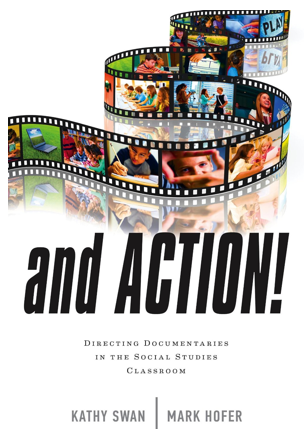
Image Source

Videography and 4MAT: Quadrant IV- Creation

4MATI am completing my series of posts connected to how videography can be integrated into one’s teaching by using the 4MAT approach to curriculum design. The following originates from the Teacher Toolkit that I created in graduate school.

Quadrant IV: Doing To Experiencing- Creation: What if I take this in a different direction? What if?

Refine- This process goes on during actual video shooting but takes place during the editing process. A great deal of creativity takes place as the video editors put the music, transitions, voiceovers, and titles to the video clips tying them together.

Perform- The 4MAT learning cycle comes full circle as the student team completes the production and editing process with a finished product. They look to see how the ideas, concepts, and messages from earlier in the cycle compared to the finished product.

Learning Climate- The students are working in the present, reflecting upon the past, and looking to the future as they put the video together. The editing environment is often tense but filled with excitement and feelings of accomplishment. They ask themselves if they visually represent what they set out to do. Do they find themselves going in a different direction or reaching different conclusions as they bring it all together?

Method- It all comes together here in self-discovery, according to Dr. McCarthy. The teacher is in the background “on call” for the editors if they request input. The editors work on the computer with the video footage to make each scene “just right,” cropping scenes and making them fit together. The remainder of the student production team views a first draft of the edited video, which leads to further creation and idea sharing of how to finalize the video’s message. The teacher can step forward and interact again using guiding questions to have the students think individually and as a team.

The camera is not used in this quadrant, but the video editing software of the production process is used to finalize the product. 

Outstanding creativity occurs as students use editing tools, music, and voiceovers to finalize their learning products.

Image Source

Videography and 4MAT: Quadrant III- Skills

4MATI am continuing with posts connected to how videography can be integrated into one’s teaching by using the 4MAT approach to curriculum design. The following originates from the Teacher Toolkit that I created in graduate school.

Quadrant III: Conceptualizing To Doing- Applications: How will I use this information? How?

Practice- The team moves into production mode, setting up the scenes and videotaping them. They use the production skills taught to them by their teacher. As mentioned, this is where authentic experiential learning takes place. McCarthy writes about students practicing and “experimenting, mastering, predicting, recording, seeing how things work, …” (p. 221). It is fun for the teacher to watch the students doing all these actions as they set up scenes and check for lighting, sound, background, etc.

Extend- The students are in fast learning mode, critiquing and improving their video skills. The students also see the concepts of their storyboard in real life, which leads to ongoing changes and new ways to make the scenes work as they had conceptualized them in their minds. At the same time, storyboards are sometimes rewritten as the production crew sees different directions to take the production. One could not ask for a more constructivist and authentic learning situation.

Learning Climate- Motion and doing, looking at possibilities, seeing what happens, and trying it again- a little differently. As you can see, many different learning intelligences come into play with digital video cameras. Every teacher has students who need movement in their learning.

Method- Dr. McCarthy points to the teacher as a coach in this quadrant. The teacher works as facilitator guiding students and setting up a structure to keep them in opportunistic learning situations. Another description might be behind-the-scenes “facilitator” as the teacher steps in with open-ended and guiding questions at opportune times. One helpful question is, “What do you think will happen if you do it that way?” One reality is that time constraints weigh in on student enthusiasm and the final product. In other words, the teacher sometimes needs to help students “see” weaknesses in their video shots in two takes instead of ten. A guiding question can bring that “aha” moment a little quicker.

The video camera is actively used in this “doing” quadrant.

Image Source

“And Action: Directing Documentaries in the Social Studies Classroom”

And Action

We know that if done correctly, videography can support our students to support the multiple pedagogies of project-based, inquiry, student-centered, authentic, etc. learning. The combination of students working in teams to create documentaries leverages the learning possibilities of using video. It is one thing to hand a camera to a group of students and say, “Create a video.” It is another way to plan, scaffold and guide students through designing, shooting, editing, and publishing a documentary. The learning rewards are abundant and rich, but it is a challenging task to perform.

Just like our students, we need all the help that we can get to teach and manage the process of having our students create documentaries. Fortunately, two leaders in instructional technology and social studies will guide us through the process.

Kathy Swan of the University of Kentucky and Mark Hofer of the College of William & Mary drew on their experience and outstanding teaching ability to provide the A to Z practical guide for documentary creation in the K-12 classroom. Their book, Action: Directing Documentaries in the Social Studies Classroom, nails it with the nuts and bolts of “how to’s.” But more importantly, Kathy and Mark provide the “how to’s” of using the videography process to help students understand the concepts, themes, and significance of their subject matter.

Look to purchase the book for yourself, your student library, and your professional development library. It is a winner.

Image Source

Student Videographers

I am always looking for examples of quality student-produced videos to provide examples of videography techniques for my students. Jim Reese of Washington International School has been telling me about a very talented filmmaker at his school. The student’s name is Sophia Pink. She was featured in a blog post at Scientific American that presented two of her incredibly creative videos. Take a look.

A second student filmmaker is my son Maxwell. Max enjoys acting and has been creating videos for several years. He is now getting serious about it and recently worked with two other 8th-grade students to produce a video for his English class. Take a look.

Festival of Learning

Learning should be celebrated and thematic. So how about having a “Festival of Learning” with all the grade levels of one’s school researching the same topic in a week-long learning celebration culminating in a greater community dinner where students share their learning projects?

The Alexandria Country Day School Festival of Learning, led by our librarian, Elizabeth Lockwood, was a wonderful experience this year, especially seeing the older students working with their younger buddies. The theme for the festival this year was endangered species. A new wrinkle to the program was having the Eighth Graders choose to work on one of three projects. The choices were to create artwork around the festival’s theme, work on the newspaper production team to report about the week, or be a member of the video production team in charge of creating a video to educate the community about our Festival of Learning theme.

If this idea of creating a festival of learning interests you and you want to pursue it further, here is how Elizabeth frames the festival’s objective.

The Kindergarten through Seventh Graders used their research to produce books. This project work is directly tied to the English curriculum goal of having students better understand the nature of non-fiction text. The Eighth Grader’s collaborative work on the newspaper and video demonstrated the value of using technology in a team and project-based learning effort. So many skills were used, from organization, planning, communication, teamwork, sound design, etc., and student engagement to make the depth of commitment to the week of learning well worth it.

“The Festival of Learning is a year-long, school-wide exploration of a single topic that celebrates our world, its cultures, diversity, and rich legacies. We can examine a theme in more depth than a single class or grade level curriculum allows. The festival promotes fascinating discovery, interdisciplinary learning, cooperative projects across grades, and involvement from the parents and outside community. The culmination is an intensive “festival” of activities the week before Spring break. Each year’s topic, chosen by the faculty, enriches the curriculum by allowing our school community to explore together an aspect of our world we may not otherwise fully realize or appreciate. We strive to help students appreciate their roles in a larger world beyond the classroom, and to generate excitement for learning.”

To learn more about the activities and projects from the Festival of Learning, look at the posts from our school blog. Just scroll down the page for multiple posts displaying examples of student learning. And here is a link to Elizabeth’s website for the festival from last year when the theme was water.

Teaching Videography

I recently started teaching videography lessons to one of my classes using diagrams and tutorials pulled from several places on the web. To give the students firsthand experience, I tasked them to work in groups to develop an idea for a short video to pitch to the group, followed by storyboarding, shooting, and editing the video. The students use a template created in Inspiration to storyboard the scenes and write their scripts using the note tool. The early lessons on lighting, audio, camera angles, etc., usually don’t sink in until the student groups shoot their two-minute videos and show them to their classmates. With their constructive criticism, their peers help those early lessons sink in.

Once we move into students creating videos for their subject area assessment projects, I plan on having several copies of The Guerrilla Guide To Moviemaking handy for students to review the basics while advancing their skills.

As someone who teaches video to elementary and older students, I especially like the way Rick illustrates his book using cartoons, which connects to students as visual learners. His step-by-step procedures provide his readers with a very understandable pathway to shoot a school video project while offering tips for students who want to expand their videography techniques.

© 2026 Lessons Learned

Theme by Anders NorenUp ↑

Skip to toolbar