Lessons Learned

Instructional Technology - International Education - Wellness

Category: Inquiry (page 1 of 4)

41 Questions to Support Your Digital Wellness

I ran across a thought leader who posted 41 questions to help his readers unpack their relationship with technology. The author is L.M. Sacasas, and here is his post. NY Times podcaster and journalist Ezra Klein dives deep with L.M. Sacasas to unpack several questions with exemplars. It is an episode really worth listening to.

41 questions are a lot to go through as they really provoke and push one to pause and contemplate the influence of technology. But I think it is worth considering how we, as educators, can use the questions in our class discussions on digital wellness. I also can see bringing the questions into individual parent meetings, workshops, and the school parent portal.

Families can pick questions to discuss during family meetings. An excellent connection is to bring in the family mission statement listing the values of the family to see how they can be incorporated into answering the questions. It would take a series of meetings, of course. Still, the time spent not only helps family members think deeper about how technology affects them, but the question-answering and reflection time also is an excellent model to help individuals stop and go through the reflection process about several influences upon their lives.

Most of the questions can be adapted to be understandable for Middle and High School students. One blended learning approach is having the students respond to the questions outside of class, recording their answers using an online discussion tool to get some sharing going before class. Once in class, students can work in groups to share their responses and possibly develop scenarios of specific tech tools to document how they answer the questions.

And just as with the parents, if you previously did some work with students on values clarification, you could do a separate lesson with students looking through the lens of their values to see how much their tech use lines up with their belief system.

It would take some time to choose and adapt the questions that elementary students can answer by doing junior versions, possibly with some scaffolding that includes real-life examples.

Image Source

Virtual School Pedagogy – Oldies but Goodies

Note: My international school is just starting virtual school for the current school year, so we are now just experiencing what many schools have been doing for most of the year. I posted the following to our Wellness blog.

I hung up my instructional technology hat a ways back, so I can’t offer the latest tools, tips, or techniques that many of our staff use in their virtual learning delivery. I can offer pedagogical strategies that have worked in the past and can definitely be supported through technology to enhance learning in virtual schools.

Concept/Mind Maps

Concept/Mind maps help students make their thinking visible, primarily when representing connections between ideas, events, topics, etc. Concept maps also can be used as collaboration tools.

An excellent way to use concept maps for virtual learning is to use an online provider like Mindmeister. Students can share their Mindmeister concept maps with you to access their thinking, especially for formative assessment of their understanding as the unit of study progresses. Virtual collaboration is supported if you partner with students or place them in groups to work together to use mind maps for multiple purposes. Here is a mind map template for essential questions one teacher provided his students. Look at a blog post describing how students used concept maps to answer the essential questions for their units of study at a couple schools.

Learning Activity Types via TPACK

Several American professors came together in 2010-11 to organize learning activity types (LAT) into nine subject areas supported by technology. They published articles about their efforts. Here is one. They provide research-supported pedagogies in their Learning Activity Types website hosted at the College of William & Mary School of Education. They apply the TPACK construct for planning purposes. Look to their website by going to the left side menu to select from the nine learning activity-type disciplines. The supporting technologies are from 2011, so adapt ones that still exist today and/or find the latest iteration or replacement tool that best supports each pedagogy. Image Source

Multimedia Essays (Media Mashups)

Writing essays is one of the most precious skills that we teach our students. But sometimes, our students can benefit from an alternative learning experience and assessment that engages the full range of their ICL skills. We can differentiate and add complexity to the standard writing process by having students create multimedia essays where they “mash up” various sources of media to communicate their thinking. At the time, a William and Mary doctoral student describes her work with multimedia essays in this podcast. Image Source

Personalized Learning System (PLS)

Students (and teachers) use technology to access information, to make meaning, to create and communicate their learning via a personalized set of resources for learning… a “go-to” 24/7 technology and information access toolkit – a Personal Learning System (PLS).

We guide our students to work as architects designing and maximizing their “learning flow” (think of the term workflow) while also engaging in time management techniques to increase efficiency and purposeful productivity. Self-directed and growth-minded students use devices, apps, Web tools, and information sources, putting themselves in charge of their learning. Here is a web resource describing what a Personal Learning System can look like and a planning document for students to work with. Image Source

Sketchnoting (Visual Note-Taking)

Our students live in a media-rich world. They think in images, video, and sound while constantly making neural connections. The creation apps on phones, tablets, and computers offer students pathways to draw, audio record, insert images/video, and embed hyperlinks to information sources, all personalized. This is where visual note-taking comes in. We can expand note-taking choices beyond text recording into multiple modalities by guiding students to use mind maps, colors, shapes, images, and digital grouping by dragging and dropping objects and connecting lines to record their thinking. Image Source

The Six Thinking Hats

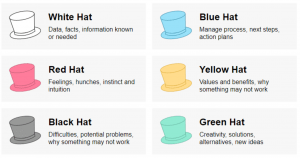
Edward de Bono created this approach to decision-making and problem-solving that guides users to think in terms of types of thinking and perspective. We can apply them for individuals and groups of students to use as they process information. Here is a helpful overview and a teacher’s application in her classroom. Image Source

Thinking Routines

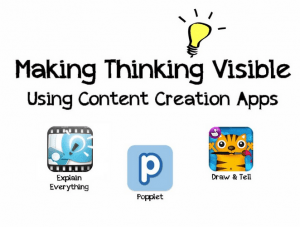
In the book Making Thinking Visible, Ron Ritchhart, Mark Church, and Karin Morisson help readers understand the power of thinking routines to help students process big ideas and make their thinking visible. Teachers routinely use the thinking routines in their regular face-to-face classes. One can also choose from a variety of technologies to also use in virtual school. Here is a dated web resource on the supportive tools one can use. However, the application of the routines is sound. If you are new to the routines, you can review an article by Ron Ritchhart and David Perkins entitled Making Thinking Visible. Also, look to go through the Harvard Project Zero Thinking Routine Toolbox. Image Source

WebQuests

WebQuests are a natural pedagogy for virtual schools because they’re already web-based. They connect inquiry and research skills to students working in teams using their communication skills to present their findings. WebQuests are online research expeditions built by teachers that put the students into roles to find information from selected sites and other resources as they attempt to solve a real problem and/or answer a question. The students in teams analyze, curate, and then use the information to create a learning product to demonstrate their understanding. WebQuests are NOT internet scavenger hunts with students just going through a list of links. True WebQuests have the students performing in the authentic roles of historians, economists, mathematicians, etc. The culminating project is usually a performance task in which the students present their findings while playing their roles or applying the learning to produce a product. Image Source

___________________________________

A significant wellness connection for these pedagogies is that they engage students in PERMAH while exercising their Character Strengths. Collaboration amplifies Relationships with students using their strengths of kindness, leadership, and teamwork, to name just a few character strength applications. The process of creating definitely has students applying their strength of creativity within the pillars of Engagement and Accomplishment.

So how do we take these oldies but goody strategies and other current innovative and effective practices to spread them throughout our virtual school? One approach would be to form a virtual school design team in each division who become busy bees finding out what’s happening in virtual classrooms elaborating on ideas, and making connections to new approaches. They then cross-pollinate throughout the division and potentially between divisions. 😁

Album Cover Image Source

How Is Innovation Nurtured at Your School?

As a new staff member at my school, I bring fresh eyes and analysis to our learning community as I try to figure out how things work and sometimes don’t work. Schools can be like individuals because they have a growth mindset to design systems to nurture innovation. Growing individuals are more open to breaking habits that don’t work to try new ones for size. But sometimes factors come into play that leads to a stuck mentality of let’s do what we have always done. We call that TTWWADI, and I have written about it a few times in this blog.

Sometimes things are working well at our schools. Teachers engage in solid practices with limited TTWWADI infestation, but creativity needs more energy for further innovation. What are the causes of the lack of creativity and curiosity? What are the barriers to innovation? What systems, structures, and roles need to be in place to teach the regular curriculum while having the time and energy to create new approaches to teaching and learning?

There are plenty of business books written about this topic. I can think of a few educational ones as well. 🙂 My intent here is to get one thinking about this topic as it pertains to your school. Instead of doing research right now, I will ask more questions.

Innovator Mindset at Your School: What is currently in place to provide space intellectually and physically for innovation? What are the current barriers to growing a culture of innovation at your school? How is your school supporting growth and a curious mindset among your teachers and administrators? How do you manage the regular administering and teaching time to free up administrators and teachers to play with, share and grow ideas? Where do you stand with strengthening your staff’s collective intellectual humility? How might we draw on the School Retool and other models to strengthen the innovator mindset in our schools?

Image Source

Guidelines for Developing a Quality Research Question

Dr. Dan Keller is our principal at the Saigon South International School elementary school. In preparation for the upcoming Project X weeklong research and design thinking experience, Dan shared his research on how to help our students’ craft inquiry questions. The following are some helpful slides from Dan’s presentation.


Teaching Assistants: The Many Hats They Wear

Two recent events reminded me of how essential teaching assistants (TAs) are in our schools. My sister, who left education over 20 years ago, recently returned to the classroom as a teaching assistant. Even with a graduate degree in education and lots of experience tutoring in after-school programs, she did not want to be a teacher again as she understood the vast responsibilities of the job. A second event was a staff email from the principal of my new school in which he shared a slideshow on inquiry that will be in a workshop for teaching assistants.

My sister could not have predicted the responsibilities and the need for her many talents when she started her job. She is now waiting for her fourth classroom teacher of the year to arrive, as two quit, and one was just fired. She works with and teaches a group of special needs students within an elementary classroom. Her days not only involve designing lessons and teaching but, from time to time, stopping fights, finding missing students, and working with her principal to develop positive behavior support techniques. While my sister’s case is extreme in all she is called on to do, mainly with behavioral issues, I am reminded of TAs I worked with over the years and the many roles they filled. I am not in a position to list all the talents and tasks teaching assistants apply in their work, but I am aware of many, especially noting that they can be true teaching partners if so empowered as they are in my new school.

In my previous schools, I provided monthly PD workshops for TAs around technology use. The workshops would begin with my learning how lessons I had taught and teacher tech initiatives were working or not working with the students. We would then learn about an instructional strategy enhanced by an app, website, or another tool. We learned strategies from one another to apply in future lessons. What helped me become a better designer was learning how the teaching assistants would help apply the strategies in their classrooms.

Now, as I shift to counseling at my new school, I definitely will look to create a program to meet with the TAs to learn from them as we further develop our guidance program.

I can see myself starting with a few questions:

  • What are the listed roles of TAs?
  • What are the unlisted ones?
  • How do the TAs feel they are perceived? Supported? Empowered?
  • What voice do TAs have in how classrooms are managed?
  • How do they see their students as learners, especially regarding social and emotional (SEL) growth?
  • What strategies and designed experiences for SEL growth have been most effective?
  • What insights might they have for parent needs in supporting SEL initiatives at home?


Image Source

Communicating and Celebrating: A Terrific Example

ics

My recent Lessons Learned over the years post about the value in finding ways to share the teaching and learning to the community is exemplified by a Kindergarten grade level website that John Mikton (@jmikton) shared out through a video showing how the teachers used the new Google Sites to construct their site. Look to check both of them out especially for examples of how the teachers document learning with media.

Collaborative Planning and Design for Technology Integration (Lessons Learned)

I am reviewing past posts, articles, and podcasts to share my main lessons learned. Here is an article written that I wrote with Mark Hofer and Margaret Carpenter.

ll

______________________

Collaborative Planning and Design for Technology Integration

Technology initiatives are continually in the headlines as schools and districts purchase iPads, Chromebooks, laptops, Learning Management Systems, and other technologies. Without a good focus, however, such expensive programs could have unintended consequences: stress among colleagues with varying agendas on how to spend the funds, purchasing of apps and hardware without a strategic vision for professional development, technology as a distraction for students, and considerable energy spent on matters that might undermine rather than enhance what students can do or understand. Furthermore, as parents show increasing concern with the mounting screen time their children are experiencing, technology’s use must be rationalized and grounded in the curriculum standards. With these obstacles in mind, school leaders should develop a systematic approach to technology infusion that brings together the community’s expertise to improve the students’ learning experience. We argue that curriculum and pedagogy, rather than technology, should drive the technology integration process.

The goal of technology initiatives and integration programs from the start should be to enhance student learning through higher­order thinking, deep learning, collaboration, and student engagement. To ensure that technology supports and enhances student learning, a collaborative approach to curriculum review and design that draws upon the distributive expertise of team members and their respective technology,​ pedagogy​ , and content knowledge​ (TPACK) is a practical approach. TPACK represents the interconnected knowledge in these three domains teachers must draw upon to integrate technology effectively. While TPACK is often conceptualized as the knowledge a single individual holds, it may not be reasonable to assume that all classroom teachers have extensive knowledge and experience in all three areas. This is particularly true regarding the ever­-expanding technology tools and resources increasingly available to them. In collaboratively designing and implementing a technology initiative, educators can leverage the TPACK construct for technology integration to identify the optimal fit between these three domains.

The integration of technology inherently changes the teaching and learning experience. While the “T” in TPACK may stand out as the goal or driver of the integration process, it should be noted that the technology also brings challenges and new opportunities for schools, teachers, and students. As educational leaders, we should consider the affordances and constraints of technology efforts as students encounter the different literacies encompassed in technology­ enhanced learning experiences.

Fortunately, schools have skilled curriculum, pedagogy, and technology experts. The specialists enjoy the advantage of understanding the needs of all students to offer strategic, articulate, and focused skill development. Classroom teachers and instructional technologists quickly come to mind. In many schools, librarians also play a leading role in helping students to develop their visual, media, design, information, and technology literacies​. In some schools, the instructional technologists partner with librarians and classroom teachers to form a collaborative, team­-based approach to developing standards, learning outcomes, and curriculum that integrates technology among multiple literacies to enhance student learning.

So how does a school encourage, support, and systematize this collaborative, team­-based planning? One approach is to build a “curriculum collaboration team” of teachers, learning specialists, and administrators who draw on their various areas of expertise to create effective, curriculum­-based technology­ infused initiatives and curricula. 

Who are the members of a curriculum collaboration team? The answer depends on the individual school, but here are some examples of curriculum, pedagogy, and technology experts that many schools can empower in this process:

● Curriculum Director/Department Chair/Team Leader­ provides curriculum expertise and guidance for the big picture of the school/division scope and sequence

● Principal or Assistant Principal­ provides insight on the school’s goals, instructional leadership, and validation for the importance of the work

● Librarian/Media Specialist­ provides expertise in both resources and tools as well as strategies to support student learning for multi­-literacies

● Instructional Technologist­ provides experience in understanding the technology options, as well as their educational affordances and constraints

● Learning Support Teachers (e.g., ESL, reading recovery, gifted, special education provide insight on ways to support differentiation for specific student populations

The Curriculum Collaboration Team partners with the classroom teachers​ in structured and ongoing curriculum meetings. They bring their various degrees of curriculum, pedagogy (including understanding the school context and student learning), and technology knowledge to the meetings. One key element of this process is that the classroom teachers are in charge and manage the meetings. In terms of process in the elementary setting, it is helpful to divide the units of study with two teachers assigned to each unit depending on the size of the school. This sharing of curriculum review responsibilities adds to the efficiency of the process while also building trust among grade level, team, or department members. One teacher provides the leadership to facilitate the meeting. At the same time, another takes on the role of scribe updating the unit plan in a collaborative word processor (e.g., Google Drive) or curriculum mapping system for all to see on the projector screen. These two roles guide the meeting and empower the teachers to take ownership of the curriculum entirely. The administrators and learning specialists bring their expertise to the table in an atmosphere of shared creativity and responsibility.

As the meeting progresses and revisions are made to the unit plan, any possible deletion of actions or materials is changed to red text. Any additions to the unit plan are added in green text. Learning specialists who cannot attend the meeting can post ideas ahead of time and respond after the meeting via the mapping tool.

The teachers meet with their grade level, team, or department teaching partners to finalize the unit plan. A “to do” list is created in one section of the unit plan with specific assignments for each team member to work on after the meeting. This may include identifying specific technology resources, developing an assessment rubric, or exploring features of a suggested technology tool or resource. The scribe then shares this document with all members of the Curriculum Collaboration Team. The lead teacher oversees the follow-through of these tasks as each participant is responsible for returning to the unit plan to add “Completed” to their tasks once accomplished. This highly structured procedure holds everyone accountable while moving the discussion and creativity of the meeting into action steps.

Team members participate in all aspects of the meeting, not just in their area of responsibility. As everyone becomes more comfortable sharing ideas and strategies, they learn from one another, thus increasing their level of expertise in each domain of the TPACK construct. Professional growth continues when the curriculum creation process includes differentiation for the content, process, and products. This is where the learning specialists add value to the process as they contribute curriculum strategies for teachers to draw from as they work to meet all students learning needs.

The implementation stage of the curriculum collaboration process allows the classroom teachers to co­-teach with the librarian or instructional technologist, gaining confidence not only in teaching the lessons on their own but also in expanding their technical knowledge to support their future curriculum planning. The same is true for the librarian and instructional technologist who gain a deeper understanding of content for units that they help teach to the point that they can begin to provide input on content and pedagogy for upcoming units of study in the collaborative meetings. This distributive approach to shared expertise can significantly enhance a school’s efforts to integrate technology into the classroom to enhance student learning.

Educators at all levels recognize the opportunities and challenges inherent in integrating technology into classroom teaching. It can seem quite daunting to envision successfully planning a school­-wide 1:1 initiative or even pulling off a single lesson using Skype for an inexperienced teacher. The authors recommend that for the greatest success, teamed teachers new to using this approach focus upon no more than one unit per semester during their first year of implementation and then build upon that success. With this collaborative approach to planning and TPACK development, all school community members can tackle these challenges and capitalize on these opportunities together.

Image Source

The Virtual Packaging and Modulation of Learning Activities- Part 2

Snowmageddon and Virtual School Preparation

storm

Is your school/district ready for extended school closure due to weather or other factors? We are preparing for a blizzard here in Virginia as folks in Washington, DC, will experience the full force of winter storm Jonas.

I have written here and spoken often on the Ed Tech Co-Op podcast about the value of developing blended to virtual learning programs in one’s school. There are many reasons for doing both, with one big one being ready to continue learning in case of a big storm like we are about to experience here in Virginia.

In the best conditions, one’s school would form a committee to research, plan and implement a blended virtual learning program. We did this at Hong Kong International School after we had to quickly respond to extended school closure due to an outbreak of SARS. We learned much in reactive mode as we constructed our virtual school to serve our families. One big lesson was that we practiced fire drills, and we needed to practice virtual school.

The virtual school committee began the annual procedure of running a week of virtual school in which teachers, students, and families connected to our online tools for learning. Our experience responding to the SARS closure expanded our blended learning when school reopened. It was a natural step to practice for the possibility that our school could close again. For more insight into our experiences, here is an article describing the response to the crisis.

With many schools having other priorities than planning for virtual school, one can still provide ideas and resources for the short-term closing of one’s school. It might provide a framework to build from in case your school might be closed for several days. Here is an example of a short listing of tools I put together to share with the teachers at my school.

_________________________________

With the advancing snowstorm and the possibility of another Snowmageddon, here are some ideas to support student learning if we miss more school days. We have several online tools and resources that students can connect to for skill work, inquiry, creation, collaboration, and direct instruction. 

Skill Development:

DreamBox (students can access at our LR website > Students > Math)

-Web Resources Math and Technology pages for math, typing, and coding skills

-myON

-Tumblebooks and other eBooks accessed at the Library Web page

-The Using Information Web Resources page also has several online reading sites for younger students and information sources for our older students

Quizlet is a vast collection of flashcards, quizzes, and other searchable resources to share with your students. You can also create your own.

Inquiry:

Access the databases on our Library Web page. Notice the direct link to the databases, but there is also a listing by grade level further down the page. See the attached database and tool password listing. Finding or creating your WebQuest is a terrific way to support inquiry, collaboration, and learning product creation.

Creation and Collaboration:

Wixie (grades 1-5)

-Google Apps (grades 3-6)

-The Web Resources Creating page has several fun and creative activities for our youngest students.

Direct Instruction:

Khan Academy and other tutorial sites

-See the PD & ICL Web page for a complete listing of potential instructional resources, including TED TalksiTunes U, and the idea of sharing educational podcasts for your students to listen to.

-Teacher-created screencast videos and podcasts> I can provide more information if you would like to create a screencast or podcast. Here are a couple of resources to give screencasting a go. Your school computer comes with Snag It, which you might have used for grabbing screenshots. It also can capture video as you open docs and websites, etc., on your screen as you voice record information for your students. If you use a Mac, you can use the built-in QuickTime Player. There are helpful tutorials on YouTube for both tools.

-Blackboard has a built-in podcast recorder (Voice Podcaster) found in the Tools section of your classroom course. Use Wixie as an instructional tool to support blended to-virtual learning. You can create videos that include voice-over explanations of images, diagrams, drawings, etc., that you build into your presentation and then share with your students via the Web. Check out the Wixie resource page for more information, including tutorials.

Sharing Your Virtual School Package:

So how can you share these resources with your students? Several of you are using Google Classroom to post resources. Blackboard is another helpful platform. Another choice is to create a simple site like our Web Resources using Google Sites or a free provider like Weebly. You also can create a Google Doc to share directly with your students if you are in our upper elementary. Consider creating a Google Doc in your personal account for the younger students and making it public. You can then email your parents the link for easy access. Our school Google Doc accounts cannot be shared publicly. The same goes for creating a Google Site using your school account.

Let me know how I can help if you want to use any of these resources and tools. For more information on blended to virtual learning, check out our blended learning page at Web Resources for Learning.

Image Source

Tech Titans: Gumshoe- Research and Information Fluency

gumshoeThe following information comes from the FCPS page listing information about Gumshoe, the Tech Titan, who represents the NETS Research and Information Fluency standard. My comments are at the end of each passage.

Unique Traits

Gumshoe is like a hound dog when searching for information.  She sniffs out imposters and selects only those websites that provide accurate information. She moves quickly through the World Wide Web by being an efficient and effective researcher.

My Take: Love the name of this character- so appropriate along with the image of a hound dog. What a terrific hook for our learners! I would expand the powers of Gumshoe to include a broader array of information sources to also list media and to break media down into examples especially for our young learners.

Special Skills

Gumshoe uses reading strategies, plans for research using a research model such as the Big 3, 6, or 12, and identifies the best sources of information to use for a given task.  She is skilled at organizing information, identifying patterns and relationships, and systematically analyzing collected data.

My Take: Again nicely written for our students to help them build their understanding. I would add the term of inquiry and include some information about curiosity leading us to find information to then as stated analyze it using the term “curation” for organizing information. The mention of one’s Personal Learning System (PLS) connects to the digital tool section below.

Digital Tools

Gumshoe uses online library databases, advanced searching techniques, and online collaboration tools such as documents, spreadsheets, and graphic organizers to help collect and visualize information.  She uses citation makers to give credit to her sources.

My Take: Love the listing of library databases and online collaboration tools. As I review these characters/standards, I am finding myself thinking of ways to provide connectors showing how each character supports the other. In this case a line or two about going from curation to creation and communication of one’s ideas might be helpful.

Image Source

Older posts

© 2026 Lessons Learned

Theme by Anders NorenUp ↑

Skip to toolbar