Lessons Learned

Instructional Technology - International Education - Wellness

Category: Inquiry (page 2 of 4)

Personal Learning System (PLS)

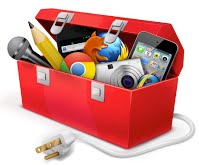
Toolbox

Students (and teachers) who use technology to access information while using digital tools to create and communicate develop a personalized set of resources for learning – a “go-to” technology and information toolbox – a Personal Learning System (PLS). They work to maximize their “learning flow” (think about workflow for those in the work world). 

Finding and using active, organized, and collaborative tools are critical to managing individual and group learning projects. Self-directed students use devices, apps, web tools, and information sources, putting themselves in charge of their learning. Students also need to be project managers who engage their PLS as they plan for long-term assignments while often working as team members. 

Active and independent students in command on the bridge of their learning ship are ready for blended to full-out virtual learning opportunities. Engaging with the school Learning Management System (LMS) and other platforms for collaboration and creation furthers our students to trek into expanded learning beyond the school and regular hours of learning.

Personal Learning System (PLS) can include supportive tools in a variety of categories. The following are a handful of options among many. 

  • Creation- Learners are shifting away from generative software that ties their creativity to a device. While there are many cloud-sharing services, it is making more and more sense to use web-based creation tools for 24/7 access and collaboration with partners and teachers. The list is long for these style creation tools, with several noted bloggers constantly writing about new options for web-based creation tools and tools that support all the PLS categories listed here. Here are a few bloggers to follow. Kathy Schrock | Larry Ferlazzo | Richard Byrne. There are several curated lists of tools to keep an eye on. 101 Web Tools | 21st Century Tools | Top 100 Tools for Learning
  • Communication– We use e-mail, phones, and social networks to connect with others. Examples: Gmail, Hangouts, texting, phone calls, Skype
  • Collaboration– Communicating to share ideas, work on projects and innovate draws upon and develops skills for 21st-century learning and the workplace. Technology facilitates the process of developing, organizing, and sharing those ideas. Examples: Google Apps, Moodle (LMS), MindMeister
  • Curation of Information– Personal Learning Systems are more effective with a place to store, organize, and share the digital information we consume and create. Examples: Google Drive and KeepScoop. it! along with a Scoop.it! collection of PLS tools, DropboxDiigoPocket,
  • Documentation of Information– We need places and modalities (ex., voice-to-text) to record and responsibly cite the ideas we gather from others and make our thinking visible. Examples: Noodle ToolsEvernoteNotabilityMindMeister, SiriGoogle NowPaperPort Notes, Google Docs for typing and voice recording to text, Audioboo
  • Project Planning– Planning for projects that involve creating a learning product engages students in using many tools in their learning system. Watching students use their Information & Communication Literacies (ICL) and their PLS tools can be a fascinating aspect of teaching. Scaffolding does need to be in place to support students, whether working individually or in teams, as they manage their time and resources to be efficient and productive. What can support this process is to provide students with a project planning template with guiding questions and supportive ideas to have them create their plans. Regarding ICL, the plan could be called the ICL Project Plan. This blog post offers a few ideas about guiding students to create an ICL Project Plan
  • Reference and General Information Gathering– Remember when we had a dictionary, thesaurus, calculator, and an encyclopedia within easy reach of our workspace? Today we have online versions of each and various apps on our devices. Examples: English dictionary/thesaurus apps, Spanish dictionary apps, French dictionary apps, language translators, BritannicaiTunes for Podcasts, Chrome Browser with Extensions, and one’s school library Web site with its list of databases. Adaptive technologies like the Rewordify Web site help students simplify text above their reading level to make it more understandable. The growing Open Educational Resources (OER) is another area for students to connect to for information. 
  • Task and Time Management– The paper planner and calendar do not provide all the services offered by a web-based event and task management calendar. We can now easily access our time management systems across our computing platforms and integrate appointments and tasks into our e-mail. We can often share our appointments and timelines with team members to support collaboration. Examples: Google Calendar, TodoistWunderlist
  • Tutorials and Courses– Developing lifelong learners who know how to learn independently is one of our primary goals. Knowing where to go to not only gather information but also learn specific skills via online tutorials is so essential. Examples: iTalki and Duolingo for languages, Vimeo Education and Khan Academy for across-the-board tutorials, Knewton for individualized tutorials, and iTunes University.

This post originates from the Personal Learning System page of the Web Resources for Learning Web site. Also, check out the Edtech Co-Op podcast, where a couple of years ago, Mark and I talked about the announcement from Apple for iBooks and our thoughts on how students could personalize them. The show offers our initial thinking about personal learning systems.

Image Source

Students Adding Their Voice to Monuments

monument

A talking bull? In a way, yes. As reported in the Wall Street Journal, a British public art society sponsors the process of adding voice-recorded interpretations to 27 statues throughout Chicago. Writers and artists are recording two-minute monologues offering their takes on the statues.

To access the audio files, one needs to scan the QR code beside each statue (see the image to the right). So how does this connect to authentic learning for our students? I am reminded of a Grade 5 unit on the American Civil War at one of my international schools. The unit common assessment had the students apply their research to design and construct a monument around an idea to communicate the effect of an event or action.

We worked with the students to stretch themselves into more abstract thinking to not just create monuments on topics or people (e.g., Robert E. Lee’s horse). The teachers guided the students to the enduring understanding of the unit with the research and monument development offering students choice and no ceiling on creative thinking.

Returning to Chicago and my belief that we can do much more with our field trips, there are many directions we can go to empower students as researchers, reporters, documentation experts, etc., regarding field trips and museum visits. I have written several posts about this topic that you should check out.

What jumps out at me here is the personal angle provided by the artists and writers in Chicago. We can plan field trips to have students research monuments and museum exhibits to provide factual audio recordings. This is fine. But we can move further up Bloom’s Taxonomy to have students process the facts and respond to carefully crafted questions to elicit more conceptual thinking and personal responses.

Teachers can develop a blended approach to this process by building out a website or sharing a Google Document listing monuments or exhibits for students to review online with provided links to follow to learn more. Students then could choose a monument or exhibit to research. Upon completion of their work outside of class, class time could then be set aside to prompt and guide students to think personally about their monument/exhibit to respond to questions to move into more abstract thinking.

One could then go in several directions. Students could write up a script and audio record their insights. The sound files could be uploaded to the teacher’s Website/Goo Doc so that when the field trip occurs, the students could use their mobile devices to listen to their classmates as they view each monument/exhibit. Another direction is to have students design their interpretation of what they think the monument/exhibit should look, sound, and feel like. Who knows? This is one where the students engaging their imaginations could lead to creative expressions of understanding.

Image Source

PYP Unit of Inquiry: Imagination Through Art and Music

wolf image

Overview: Our Fourth Graders worked with their art and music teachers to apply their imaginations in a project that came together using the Explain Everything app on the iPad. They also reflected in their language homeroom classes, writing about their thinking as they created their multimedia project.

Here is a short video reviewing the teaching and learning for the “Imagine This” unit of inquiry. It includes a sample screencast by one of the students.

Process: The art and music teacher wrote up overviews of their lessons. Here they are.

Art: Laura Evangelista

The students learned how composition (the placement of objects within a space), shapes, colors, and lines communicate messages to the viewer. We first focused on how people associate specific body movements when they hear a particular sound. Students were instructed to stand up around the large table in the Art room. They were told to remain quiet, and when I told them a specific sound, they were to mime and act out the sound for 30 seconds. They responded to the sound of popcorn popping, a sizzling steak, a heavy metal band, and thunder. The students were then asked what they saw among their classmates when the students acted out sounds. Were the classmates’ bodies in jagged motions? Were the bodies close together? Far apart? They were then given a worksheet listing nine different sounds, and using only a pencil; they needed to come up with compositions that would visually communicate each sound.

After we understood how composition plays an essential role in communicating messages to the viewer, the students inquired into the color wheel and began analyzing color combinations. We spoke about how the primary colors are solid and robust while connecting them to the world and where we see those colors. We spoke about the secondary and tertiary colors and then went into color combinations. We reviewed paintings with complementary, analogous, and monochromatic colors and spoke about how different color combinations communicate different sounds. Students took notes in their sketchbooks.

Finally, lines! I asked them questions about particular sounds and had them draw in their sketchbook the types of lines that came to mind when they heard their sound. Next, they applied lines to their worksheet to show the sound’s type, pitch, and volume in the correct color. They then colored in their worksheet with the type of color combinations for each sound so they could focus on how colors play a significant role in communicating messages to the viewer.

Music: Mireille Nasr

The launch of this unit in music class started by sharing with the students’ examples of music that illustrate how imagination motivates and drives us to break conventions and surpass reality to promote growth and advancement. Students listened to several excerpts of different genres and styles of music. Then they described their feelings while listening and trying to guess the message the composers hoped to convey through their compositions. Students also described the mood, tempo, dynamics, instruments used in the composition, and their respective timbre.

The student analyzed several artworks from different styles and historical periods. They discussed the colors used, the subject(s) of the painting, the style as well as the message the artist tried to convey through the painting. The students then worked to match paintings and musical excerpts and justify their choices.

They also learned about timbre while acquiring the vocabulary they needed to describe the nature of sound as bright, dark, resonant, rounded, complete, thin, reedy, choppy, harsh, etc. descriptors.

The next step was to have each student identify an idea they would like to express in music and artwork. Each student used various digital media to express their idea in music:

-GarageBand

-Digital Keyboards

-Various musical instruments

-Sound-making objects

The students created multiple tracks in GarageBand Students mixing and editing the different timbre of sounds. They learned to fade in and out, finding the correct pattern of sounds, frequencies, and vibrations to communicate their idea.

Image Source: Finn

The PYP in Practice

PYP

The folks at the IB recently posted an excellent video sharing teacher voices explaining what makes the Primary Years Programme (PYP) so valuable. The teachers echo much of what we read about from progressive educators via the blogosphere and Twitter. It is worth viewing. Scroll down to the following link to see the video.

PYP in Practice

Image Source

PYP-ICL Exemplar and Personalized Higher Edu

PYP Teachers

PYP teachers tell their story of a inquiry, collaboration and ICL integration. Look to watch the video.

Check out an excellent Washington Post article on MOOCs and personalized higher edu. The timing of our Ed Tech Co-Op podcast team could not be better. We will soon be posting another episode with Jeff Nugent, Director of Academic Technologies at Colgate University as we speak to his work with edX.

Using TPACK to Guide a 1:1iPad Pilot

TPACK article

I am working on an article with Mark looking at putting TPACK into practice working from the ICL perspective and not just technology. I did not share the article THE Journal published in August, where we share information on using TPACK in going 1:1. 

Hopefully, the article provides some ideas as schools look to use TPACK and the curriculum collaboration process to support 1:1 initiatives. Here is the article.

Zoom In Thinking Routine in Kindergarten

Zoom InCecilia Rios, a Kindergarten teacher at Washington International School, shares her interpretation of the “Zoom In” thinking routine in the following video. As I recorded the teaching session, I marveled at how Cecilia pushed her students to analyze information and make connections while speaking in Spanish.

The Zoom In Thinking Routine

Using Online Databases for Inquiry with Primary Students

PG

Do you use the PebbleGo online database with your elementary students? PebbleGo supports UDL by highlighting words as they are read to the students. The entries are also media-rich so that students can further see and hear to learn about the topics. It provides a terrific way to start teaching research skills to young students who need more reading skills to gather information from text-based resources.

Students at my school are introduced to PebbleGo beginning in Kindergarten as part of our Information & Communication Literacies (ICL) curriculum. In Grade 1, we guide students to understand further how the information is organized. In Grade 2, they start taking notes using a provided organizer with guiding questions.

The following is a link to a short video of Doris Clingman, our assistant librarian, describing a lesson with students researching a PYP unit of study. She is working with Second Graders in our Spanish program.

Using Online Database for Inquiry


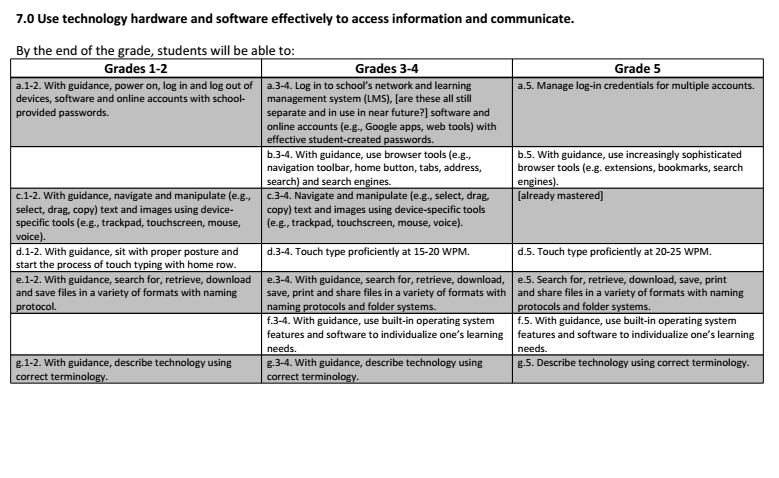
ICL Learning Outcomes: Strand 7 – Using Technology Hardware and Software to Access Information and Communicate


7Sources

Teaching Biology by Turning the School into the “Student Body”

HB-HKIS

I was in a curriculum meeting this past week as we planned for the upcoming Human Body unit. The teachers would teach the biology of systems in our bodies while also helping students better understand the concept of systems. This discussion took me back to an effort that my wife Margaret, Debbie Wright, and myself put forth at Hong Kong International School many years ago. Margaret was the media specialist and gifted coordinator. Debbie was the science coordinator, and I worked as the instructional technologist.

We participated in the grade-level curriculum planning meetings as part of our curriculum collaboration system. In preparation for the upcoming half-day planning meeting for the human body unit, we decided to brainstorm a bit to see if we could present some new ideas for teaching the unit. Our discussion quickly jumped into very creative territory as we wanted to use the teaching of the content knowledge to help the students understand the concepts of the unit. We also wanted a research component that would include students working in teams while producing authentic project(s) with the students driving the learning. We also hoped to connect to subject matter experts in the community while enticing our students to use multimedia and their communication skills to promote their assigned systems. We also connected to the new and exciting TV event of those days… reality TV, where folks were being voted off an island. It was 2004. 🙂

While this effort took place so long ago, I can remember enough that I decided it would be worth recording an EdTech Co-Op podcast to offer more information. Here is the link to that show. What we tried to do might offer readers some ideas as you approach teaching systems and human biology. Most elementary schools teach this topic. I found some of my notes from our proposal to interest you in listening to the podcast. They are listed below. I wrote them up for my third visit with the team of teachers as it was a hard sell trying to get some traction with our ideas.

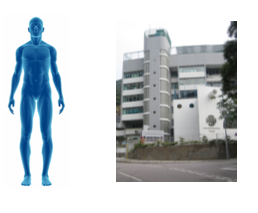
I left out in the notes the most innovative aspect of our proposal. We wanted to empower the students to use their art, creativity, and construction skills to turn our building into what we would call the “student body.” In other words, teams of students assigned to specific systems (i.e., circulatory, skeleton, etc.) would turn parts of our school into their system. Think of the elevator in our eight-story building being the spinal cord with posters inside explaining the function of the spine and information on each floor explaining discs, nerves, etc. We wondered if the students would turn the library into the brain or if they would make the principal’s office the thinking center of our student body. 🙂

Here are my proposal notes. They are based on two previous meetings, so they might need clarification. But, between the podcast and these notes, they paint the picture and offer some ideas as you look to teach biology in an elementary school setting.

Phase I: Learning Individual Systems

Each teacher teaches an assigned system to their class. This class then becomes the headquarters for the system (e.g., Skeleton HQ). Each teacher will use media provided by the library and instructional materials from last year’s teaching materials to do some direct instruction to give students a foundation of knowledge.

Each system HQ would then experience a WebQuest where student teams (maybe partnered up) would go through the heavily scaffolded WebQuests gathering information leading up to a system scenario simulation (e.g., the skeleton system must deal with a broken leg, the circulatory system deals with a blood clot, etc.). The scenarios could be tiered, giving the more EL-like students more complex situations.

Phase II: Teaching and Promoting Individual Systems

The students move into applying their knowledge of their respective systems by building displays and teaching stations and creating advertisements to promote their systems. This could be a creative time as students use different types of intelligence to create image slideshows with voiceovers, videos, pamphlets, TV commercials, public speeches, etc. Students should work in teams for this phase. Parent volunteers would be helpful to have during this process.

Once all the work is completed in all the system HQs, classes visit each other’s classrooms to learn about the different systems. A standard questions template would be given to all the students, who would then answer the questions for each system HQ they enter.

Phase III: Whole System Jigsaw Simulations

Teachers would work together to create teams combining one student from each class into six-person jigsaw teams. A whole “4th Grade System Body” simulation would be initiated where each jigsaw team is given a template questionnaire guiding them through determining how they think all the systems would react individually and how their interconnectivity would affect the overall body. These explanations could be sent to doctors to evaluate and comment on the student’s findings. This would be more project-based, giving the students an authentic audience while applying their learning to real-life situations (e.g., bacterial infection and not eating for four days)

Conclusion: System Survivor

A few possibilities…

We could do a 4th-grade vote to decide which system is the least important and should be voted off the floor. The competitive nature of many of our students could engage them in building arguments, advertisements, and teaching stations that work to get their message across.

There could be a series of debates or public presentations where students from each system HQ get a couple of minutes to present their cases to a series of teacher judges.

Each system could prepare a DragonNews presentation to sell their system to the entire UPS. After all the presentations, there could be a school-wide vote to decide which system is the most important and should stay in the 4th-grade hall. We would not want a “loser” with the entire school voting. It could be painful.

Note: Remember that Margaret, Deb, and I would plan and prepare for this unit. Working as designers, we would check in with you as we develop the student questionnaires, WebQuests, scenarios, etc., to develop the materials based on the needs of your students. And we have a few months to do this work and get parent volunteers for the simulation activities. If we proceed with this proposal, I will work with Deb to align the standard and benchmarks with the unit template.

Image Sources: Human Body | HKIS Building

Older posts Newer posts

© 2026 Lessons Learned

Theme by Anders NorenUp ↑

Skip to toolbar